Ask Computer Network & Security Expert

Question: Syslog

Earlier in this chapter, you viewed and manipulated log file entries on a computer running Windows. In this project, you do the same on a computer running the Linux operating system. Because Linux versions vary in the type of GUI application that allows you to open the system log, this exercise uses the command-line method instead. For this exercise, you need a computer with a Linux operating system installed, such as the Ubuntu Desktop VM that you created in Chapter 2. It need not be connected to a network, but for best results, it should be a computer that has been used in the past and not a fresh install. You must be logged on to the Linux computer as a user with administrator privileges.

1. If you are not already at a command-line (or shell) prompt, open a terminal session now.

2. The syslog file contains information similar to that shown in Figure 9-24. The first step in viewing your Linux computer's system log is to find out where the file is located. Try each of these commands until you find the syslog file that contains information similar to that in Figure 9-24

more /etc/syslog.conf

more/etc/rsyslog.conf

more/etc/rsyslog.d/50-default.conf

3. The first part of the syslog file appears. In this part of the file, you should see a list of log types and their locations, similar to the listing shown in Figure 9-24. (If you don't see the listing in this part of the file, press the Enter key until you do see it.)
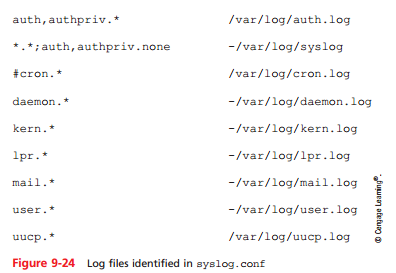
2079_9-24.png

4. Write down the location and filename of the file that logs all events, as indicated by *.* in the first column. (For example, it might be /var/log/syslog or /var/adm/ messages.)

5. Press the Spacebar enough times to view the entire log configuration file and return to the command prompt.

6. Now that you know the name and location of your system log, you can view its messages. At the command prompt, type tail /var/log/syslog if your log file is at / var/log/syslog; if your log file is at /var/adm/messages, type tail /var/ adm/messages. Then press Enter.

7. The last 10 lines of your log file appear (assuming it is at least 10 lines long). What types of messages are recorded? When did the events occur?

8. Next you'll find out all the types of log files your computer saves. Type cd /var/log if your log file is in the /var/log directory, or type cd /var/adm if your log file is in the /var/adm directory. Then press Enter. You have changed your working directory to the same directory where log files are kept.

9. To view a listing of the directory's contents, type ls -la and press Enter. Notice the types of log files that appear in this directory.

10. Suppose you want to find every message in the system log file that pertains to DHCP addressing. At the command prompt, type grep DHCP syslog if your log file is named syslog or grep DHCP messages if your log file is named messages. Then press Enter. A list of messages containing the term DHCP appears. Consider how you might use grep and other UNIX commands in a script that would notify you each time a workstation on your network failed to obtain a DHCP-assigned IP address. (Note that this can be accomplished from most GUI system log interfaces, too.)

11. If your operating system is configured to start a new log file each day or each time the computer is restarted, your log file might be brief. Repeat Step 9 and, this time, look for other versions of the syslog or messages file in your working directory. For example, Ubuntu Linux will save older system messages in a file called syslog.0. If you find a larger, older log file, repeat Step 10 using this log file's name. How do the results differ?

12. Close the Linux terminal session window.

Computer Network & Security, Computer Science

  • Category:- Computer Network & Security
  • Reference No.:- M92324991

Have any Question?


Related Questions in Computer Network & Security

Security challenges in emerging networksassignment

Security Challenges in Emerging Networks Assignment Description The purpose of this assignment is to develop skills to independently think of innovation. In this assignment students will first learn how to develop knowle ...

Security challenges in emerging networksassignment

Security Challenges in Emerging Networks Assignment Description The purpose of this assignment is to develop skills to independently think of innovation. In this assignment students will first learn how to develop knowle ...

Security challenges in emerging networksassignment

Security Challenges in Emerging Networks Assignment Description The purpose of this assignment is to develop skills to independently think of innovation. In this assignment students will first learn how to develop knowle ...

Security challenges in emerging networksassignment

Security Challenges in Emerging Networks Assignment Description The purpose of this assignment is to develop skills to independently think of innovation. In this assignment students will first learn how to develop knowle ...

Advanced network design assessment - human factors in

Advanced Network Design Assessment - Human factors in network analysis and design Purpose of the assessment - This assignment is designed to assess students' knowledge and skills related to the following learning outcome ...

Advanced network design assessment - human factors in

Advanced Network Design Assessment - Human factors in network analysis and design Purpose of the assessment - This assignment is designed to assess students' knowledge and skills related to the following learning outcome ...

Assignment descriptionproject scope a typical network

Assignment Description Project Scope: A typical network layout diagram of a firm is given below for illustrative purposes only. The service requirements are enclosed. Figure. Network layout of a firm Service requirements ...

Assignment descriptionproject scope a typical network

Assignment Description Project Scope: A typical network layout diagram of a firm is given below for illustrative purposes only. The service requirements are enclosed. Figure. Network layout of a firm Service requirements ...

After reading this weeks materials please respond to two 2

After reading this week's materials, please respond to TWO (2) of the following questions. AND PROVIDE CITATION IN APA 1. Describe the differences between bus, ring, star and mesh topologies. 2. Explain the TCP/IP Model ...

The abstract should not be more than 250 words describe

The abstract should not be more than 250 words. Describe your project, focusing on research questions and research method for next stage of the project. 1. Introduction [The introduction should describe what the project ...

  • 4,153,160 Questions Asked
  • 13,132 Experts
  • 2,558,936 Questions Answered

Ask Experts for help!!

Looking for Assignment Help?

Start excelling in your Courses, Get help with Assignment

Write us your full requirement for evaluation and you will receive response within 20 minutes turnaround time.

Ask Now Help with Problems, Get a Best Answer

Why might a bank avoid the use of interest rate swaps even

Why might a bank avoid the use of interest rate swaps, even when the institution is exposed to significant interest rate

Describe the difference between zero coupon bonds and

Describe the difference between zero coupon bonds and coupon bonds. Under what conditions will a coupon bond sell at a p

Compute the present value of an annuity of 880 per year

Compute the present value of an annuity of $ 880 per year for 16 years, given a discount rate of 6 percent per annum. As

Compute the present value of an 1150 payment made in ten

Compute the present value of an $1,150 payment made in ten years when the discount rate is 12 percent. (Do not round int

Compute the present value of an annuity of 699 per year

Compute the present value of an annuity of $ 699 per year for 19 years, given a discount rate of 6 percent per annum. As